

International Screening

Across Borders, One Platform

Streamline candidate intake and document collection with automated workflow alerts that keep your team informed.
  • Country-specific checks and provider follow-up
  • Secure Candidate Portal with language options
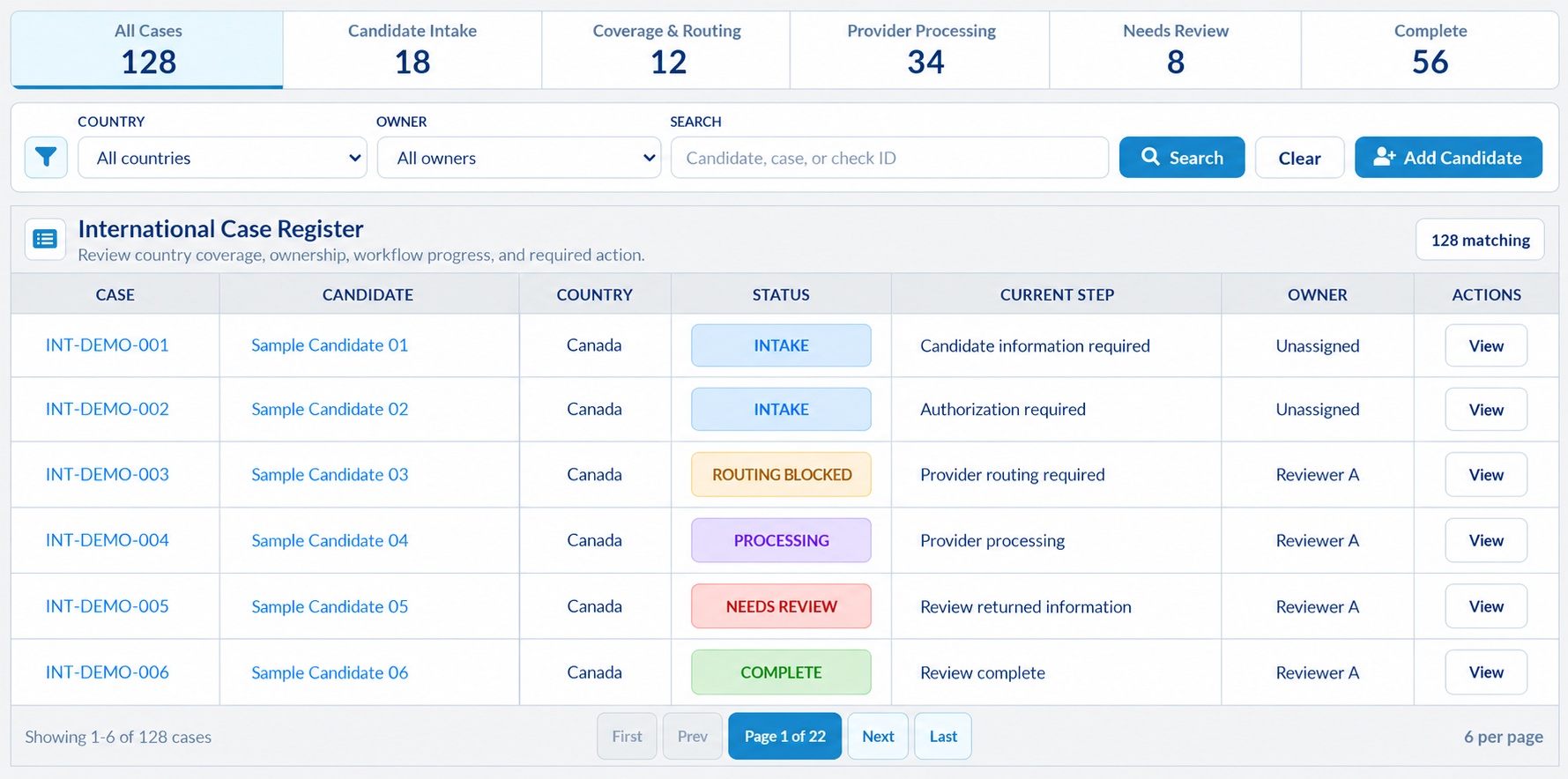
IDC International Screening dashboard with illustrative totals of 128 cases: 18 in intake, 12 in routing, 34 processing, 8 needing review and 56 complete; six fictional candidates shown
International Case Management

Country Scope

Confirm country checks and provider routes.

Candidate Portal

Collect intake, consent, and documents.

Workflow Updates

See progress, owners, and next actions.

Case Review

Review results in country context.

Inside the Workspace, Streamlined Screening

Explore how country setup, candidate intake, provider progress, and returned results fit into your team's workspace.

Country CoverageSetup required

Illustrative case view

Know what each location needs

Confirm country checks and routes before candidate intake starts.

Country selection
Defined for the case
Required checks
Country-specific scope
Provider route
Confirm availability

Next actionConfirm country and provider setup

Candidate PortalCandidate action

Illustrative case view

A smoother path through the Candidate Portal

Bring intake and document tasks into one secure Candidate Portal.

Candidate access
Secure Candidate Portal
Information
Identity and country history
Task owner
Candidate

Next actionComplete the requested intake

Consent & IdentityEvidence required

Illustrative case view

Keep requirements with the person

Keep consent and ID evidence in view so gaps are easy to spot.

Authorization
Country-specific consent
Identity evidence
Required documents
Case readiness
Outstanding items visible

Next actionResolve the required authorization or evidence

Provider ProgressWorkflow visibility

Illustrative case view

Automated Progress Updates

See check progress and open tasks in Quickview to act sooner.

Components
Required and completed checks
Provider activity
Recorded progress and timing
Open requirement
Shown in Quickview

Next actionInspect the current requirement

Review & RecordsHuman review

Illustrative case view

Review results with their country context

Review results with country details and case history in one view.

Review owner
Assigned reviewer
Returned information
Provider results and exceptions
History
Recorded case activity

Next actionReview the returned information

Confirm country, check, and provider availability with IDC during program setup.

Fast, Compliant Screening Done Right

Run A Check

Screening Scope

Start With the Right Country and Checks

Plan each search around where the candidate lived, worked, or studied. Available components depend on the confirmed country program.

Criminal Records

Examine returned criminal findings with the country and check details attached.

Employment Verification

Review employment details alongside returned findings to assess reported work history.

Education Verification

Review qualifications and institution details alongside returned education findings.

Adverse Media

Assess returned media findings alongside the candidate's other screening results.

Three hiring colleagues reviewing a laptop together with a world map behind them

From Candidate Portal to Case Review

Give candidates a clear starting point, specific requests, and a secure place to complete their part.

  1. 01

    Prepare the Invitation

    Confirm the country scope before inviting the candidate to complete the requested intake.

  2. 02

    Guide Portal Tasks

    Give candidates one place to provide details, sign consent, and upload requested documents.

  3. 03

    Follow Up on Intake

    See unfinished candidate tasks and use invitation follow-up controls to help intake move forward.

Automated Workflow, Clear Ownership

Less Chasing, Clearer Ownership

Focus your team's workload by owner, country, or stage. Open the cases that need attention and identify what is holding them up.

An operations coordinator and colleague reviewing the next action together on a laptop
Find the Case Owner
Find the assigned reviewer so follow-up reaches the person responsible for the case.
Identify the Next Action
Open Quickview to see the requirement holding the case and the next permitted step.
Track the Handoff
See when work moves from candidate intake to provider processing and assigned review.
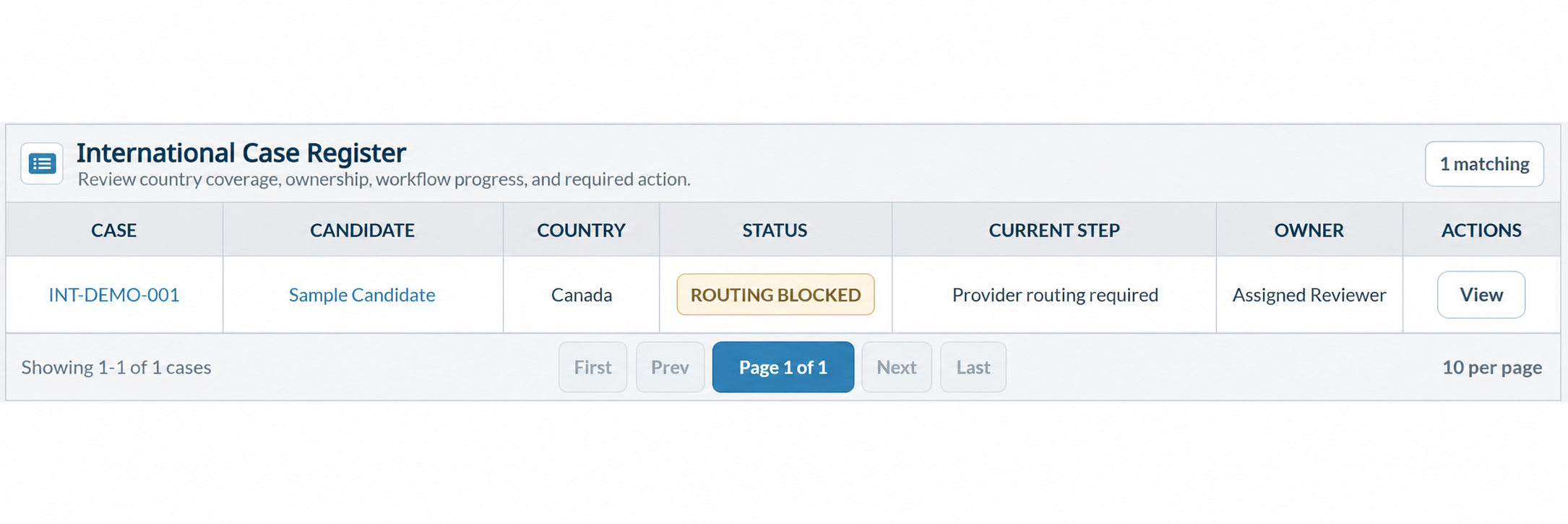
International Case Register showing a sample Canadian case, Routing Blocked status, Provider routing required next step, and an assigned reviewer
Country, case status, next step, and ownership in one registerSwipe to inspect the register

Common Questions

Plan Your International Program

Explore the tools that support program setup, candidate participation, and everyday review.

An international screening support specialist answering questions on a headset call
One Connected International Case

Open one case for country checks, candidate submissions, and returned information. Review the full screening picture without piecing together separate updates.

Automated Workflow Coordination

As tasks and results change, workflow updates align the case status and next action. See the outstanding requirement without manually comparing each stage.

Guided Candidate Portal

Give candidates one secure place to submit country details, consent, and documents, with language options where enabled. Review unfinished tasks and invitation follow-up controls to keep intake moving.

Country-Specific Screening Scope

Build the case around the criminal, employment, education, or adverse media checks your program needs. Confirm country and provider availability with IDC before starting intake.

Clear Ownership & Next Actions

See the assigned owner alongside the current step so work has a clear point of contact. Filter the queue by owner or country, then open the case to identify who acts next.

Component Progress in Quickview

Open Quickview from the register to inspect check progress, provider activity, and timing without losing your place. Review open requirements to focus follow-up on the work still outstanding.

Connected Results & Review History

Revisit results and evidence with the case history. See prior activity before following up.

Real-time Background Checks

Run A Check